Capture controls
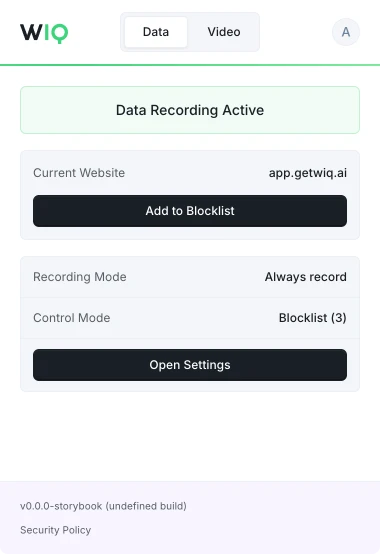
Allowlist and blocklist by app, domain, and time window. Nothing outside the policy is ever recorded.
Map how work actually gets done across your tools. Find high-impact processes to automate and create full-context agent specs, without months of discovery.
Open the downloaded .dmg file, then drag the WIQ Recorder application into your Applications folder. Launch the app and follow the steps to enable Accessibility Access.
Download .dmgDownload WIQ Recorder from the Microsoft Store. To install, open the downloaded .exe file. Once installed, you can launch the app from your system tray and log in.
Microsoft StoreGo to the Chrome Web Store and add the WIQ Extension to your browser. For easier access, we recommend pinning the extension from your browser's extensions menu.
Chrome Web StoreGo to the Microsoft Edge Add-ons store and add the WIQ Extension to your browser. For easier access, we recommend pinning the extension from your browser's extensions menu.
Edge Add-ons
Decide what WIQ can see, what each agent is allowed to do, and where it runs. Every run is checked against the approved blueprint and logged.
Allowlist and blocklist by app, domain, and time window. Nothing outside the policy is ever recorded.
Scope the tools each Agent can reach and the actions it can take. Set the approval gates and escalation paths before it runs.
Every run is checked against the approved blueprint. Deviations are flagged and exceptions route to the right person.
Run locally where the work happens or inside your own cloud. The work never has to leave your environment.
WIQ combines observed work, existing documentation, and input from your team to build process blueprints.
A blueprint describes the process steps, required tools, and approval points. Your team reviews it before deployment.
Agents run in your existing AI platform using WIQ blueprints. Deployment depends on the tools and access each workflow needs.
Admins and users can define which apps and sites WIQ records using allowlists and blocklists.
WIQ surfaces process changes and helps your team review and approve blueprint updates before deployment.