

//get_a_demo

Got you interested?

Book a demo call with our experts to learn more about WIQ's capabilities and how it can help you scale faster.

  • See WIQ map a real process end to end.
  • Get a blueprint generated from your own work.
  • Talk through deployment on your agentic platform.
//security_and_compliance

Your data. Your rules.

WIQ is built for enterprises that take data privacy seriously. Everything runs within a security framework designed for regulated industries.

SOC 2 Type II GDPR CCPA
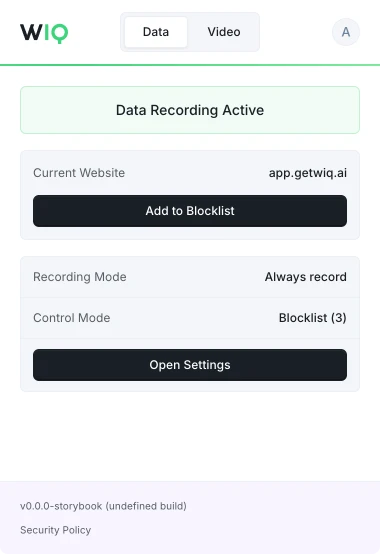
  • Granular allowlist and blocklist controls. Org admins and individual users decide exactly what data gets captured.
  • Configurable capture windows. Limit mapping to specific apps, domains, or time periods.
  • Data residency and retention policies that meet your compliance requirements.
//faq

Frequently asked questions

Privacy & data
Is my data secure and private? +

Yes. WIQ is SOC 2 Type II certified and GDPR compliant. We work with clients that have strict privacy requirements in the US and internationally. All data is encrypted in transit and at rest, and we support configurable data residency and retention policies.

What data does WIQ capture? +

WIQ captures browser and desktop interactions like clicks, navigation, and page content to reconstruct how processes are executed. You have full control over what gets captured. Org admins and individual users can configure allowlists and blocklists to include or exclude specific websites and apps. Recording can be restricted to specific time windows and days of the week. Fine-grained data masking is available to redact sensitive fields before data leaves the user's machine.

How will my data be used? +

WIQ uses captured data to reconstruct how your team does work and to generate automation blueprints. We are not in the business of performance management. Your data is used to map processes, measure handle times, identify automation opportunities, and build agent specs.

Will my data be used for performance management? +

No. WIQ exists to reconstruct processes and help you automate them. We do not build features for individual performance scoring or surveillance. Individual data can be anonymized and aggregated by request.

Can individual users control their own recording? +

Yes. Each user can independently configure their own blocklists, allowlists, and recording schedules through the WIQ browser extension. Users can stop recording at any time.

Platform & integrations
What agentic platforms does WIQ support? +

WIQ currently supports Claude (via MCP) and Workato. Additional platforms are being added by request. If you use a specific platform, let us know and we can discuss integration.

How does WIQ connect to my agentic platform? +

WIQ exposes an MCP server that your agentic platform connects to. Through MCP, agents can query process analytics, retrieve blueprints, check tool availability, and get updates. Your platform handles agent execution; WIQ provides the process context.

What is a blueprint? +

A blueprint is a complete automation spec generated from observed human work. It includes structured agent instructions, a list of required tools and integrations, guardrails, escalation paths, and human checkpoints. Blueprints are designed to be deployed directly into an agentic platform.

What tools and systems does WIQ work with? +

WIQ captures data from any browser-based application and most desktop apps on macOS and Windows. On the integration side, blueprints track the specific APIs, MCP servers, and internal tools that agents need. If a required tool doesn't exist, WIQ helps you identify the gap so you can build or connect it.

Process mapping & discovery
How does WIQ discover processes? +

WIQ's browser extension and desktop app passively record user interactions. Then WIQ's algorithms automatically identify repetitive processes, cluster them, and generate a structured process report with visual graphs, step breakdowns, and handle time measurements.

Do users have to change how they work? +

No. WIQ captures data passively in the background. Users work exactly as they normally do. There is no need to tag activities, fill out forms, or follow a specific workflow during mapping.

Can I map a single process instead of my whole operation? +

Yes. WIQ offers Quick Capture mode, which lets you record a single process end-to-end and generate a blueprint from that one run. This is useful for ad hoc processes or one-off automations that don't require a full mapping deployment.

Blueprints & automation
Do I need to write automation specs manually? +

No. WIQ generates blueprints automatically from observed human work. You do not need to write skills, document steps, or spec out agent behavior by hand.

What happens when a process changes? +

Blueprints are self-healing. WIQ continuously monitors how work is done, and when a process changes, the corresponding blueprint updates itself to reflect the new steps, tools, or workflows.

How does WIQ calculate time savings? +

WIQ measures actual human handle time for each process by tracking active work time (not ticket open-to-close). When a blueprint is generated, WIQ calculates the percentage of cases that are automatable and the total handle time that would be saved, based on historical data.

Deployment & monitoring
How do I deploy agents? +

Connect your agentic platform (Claude, Workato, etc.) to WIQ via MCP. The platform retrieves the relevant blueprint and executes agent sessions against your task queue. WIQ provides the process context and monitoring; your platform handles execution.

Can I run multiple agents at the same time? +

Yes. You can launch concurrent agent sessions that work through your task backlog in parallel. Each agent follows the appropriate blueprint and operates autonomously until it encounters a checkpoint or escalation trigger.

How does WIQ monitor agent performance? +

WIQ tracks the same metrics for agents as it does for humans: handle time, SLA compliance, conformance to the blueprint, and deviation detection. You can compare agent and human performance side by side across any process.

Getting started
How long does setup take? +

Installing the WIQ browser extension and desktop client takes a few minutes per user. Org-level configuration (teams, roles, privacy policies) is typically done in under an hour.

Do I need engineering resources to get started? +

No. WIQ is deployed by individuals and teams directly. The browser extension installs like any Chrome extension, and the desktop client is a lightweight download. No code changes, API integrations, or IT projects are required for process mapping. Depending on available MCPs in your automation platform, you may require assistance from your IT administrator.

//human_to_agent

Ready to go from human to agent?

See how WIQ turns your team's expertise into an autonomous agent fleet.

Get a demo