Reduce avoidable port charges by coordinating shipments sooner.

WIQ learns how your logistics team resolves delays across visibility tools, transport systems, and carrier emails, then builds agents that coordinate release, pickup, receiving, and empty returns.

A distribution centre on the quayside: a forklift loading pallets at the bays, a green trailer at the kerb and a container ship being worked under the cranes behind it
Potential Impact
−60% Exception handling time
−$720K/yr Demurrage & detention

Recover import container IMP-204

It's Tuesday. Can we get IMP-204 out before free time expires? Show me a plan and any added cost.

What would you like to do?

The Problem

Recovering a delayed shipment requires several teams to agree on a plan.

Book a demo

A container may be ready for pickup while the truck appointment falls after its last free day. Moving it sooner requires confirmed release, an available carrier, warehouse capacity, and enough time to return the empty equipment.

Dispatchers pull those details from shipment systems, terminal records, and email. WIQ captures their process so an agent can collect confirmations, compare the options, and bring the dispatcher a workable plan with the cost attached.

How WIQ builds this agent.

WIQ learns the process from the way your team already runs it, then turns it into an agent you can deploy.
Book a demo

WIQ learns how your team handles the process.

WIQ follows a dispatcher checking terminal events in project44, confirming carrier terms, and arranging pickup and delivery in Oracle Transportation Management. It captures the correspondence and rate checks that determine whether a recovery plan is workable.

Activity Feed Live
  • Open IMP-204: import demurrage last free day tomorrowLuis · project441m 46s
  • Check customs and carrier release events with source timestampsLuis · project441m 51s
  • Confirm terminal pickup availability and carrier empty-return termsLuis · Microsoft Outlook42s
  • Read current pickup and receiving appointmentsLuis · Oracle Transportation Management58s
  • Request earlier pickup and warehouse receiving confirmationLuis · Microsoft Outlook1m 17s
  • Approve $150 incremental carrier costDana · Oracle Transportation Management1m 52s
  • Record confirmed pickup and delivery appointment referencesLuis · Oracle Transportation Management5s
  • Verify actual gate-out and later empty-return eventsLuis · project445s
  • Attach movement evidence and final charge reviewLuis · Microsoft SharePoint43s

WIQ builds a Blueprint from the way your team works.

The Blueprint includes the terminal pickup deadline, equipment-return deadline, release checks, and appointment confirmations. The logistics team reviews carrier selection and spending limits so the agent knows which changes require dispatcher approval.

Container exception recovery

Potential Savings per Case30 min
Est. Cases per Week400

Steps

6
Unverified0
Manual1
Ready5
1

Verify release and deadline facts

Readyproject44Oracle Transportation Management

Read project44 events and timestamps, then confirm terminal availability and carrier terms. Missing coverage is an exception, not a guessed deadline.

  1. 1.1Open a shipment from the team’s Import free-time exceptions worklist in project44 (ex: IMP-204). Match its container and bill-of-lading references to Oracle Transportation Management, retaining the terminal and carrier references.
  2. 1.2Read the latest release and hold events, including their occurrence and update timestamps. Confirm customs and carrier release without treating an earlier clearance as proof that no newer hold exists.
  3. 1.3Check the reported LAST_FREE_DAY event and its description for terminal demurrage. Reconfirm the deadline, local timezone, and pickup availability with the terminal (ex: Wednesday at 17:00 terminal-local).
  4. 1.4Attach the confirmation and source timestamps to the shipment record. If release status or free-time coverage is missing, ask the terminal for the missing fact before proposing a pickup.
2

Separate the two clocks

Readyproject44Microsoft SharePoint

Record the terminal demurrage deadline and the carrier equipment-return detention deadline separately, including local time and contract terms in Microsoft SharePoint.

  1. 2.1Create separate deadline rows in the shipment working record for Import demurrage and Import detention. Use the LAST_FREE_DAY description to distinguish them when project44 supplies both.
  2. 2.2Record the pickup deadline in terminal-local time and the empty-return deadline in depot-local time. Retain a source confirmation for each; the dates and timezones may differ.
  3. 2.3Open the relevant Microsoft SharePoint rate sheet and free-time terms. Check calendar-day rules, free-time extensions, and the charge trigger before counting chargeable days.
  4. 2.4Calculate chargeable days under the applicable terms and rate tiers (ex: two days at $250 per day gives $500). Keep terminal exposure separate from equipment-return charges and recovery premiums.
3

Build a feasible movement plan

ReadyOracle Transportation ManagementMicrosoft Outlook

Check Oracle Transportation Management shipment stops and get actual truck and receiving-slot confirmations through Microsoft Outlook.

  1. 3.1Open the shipment stops in Oracle Transportation Management and read the current pickup plan. Check travel time, receiving hours, and unloading requirements before moving a single stop.
  2. 3.2Use Microsoft Outlook to obtain a feasible truck, terminal slot, and warehouse appointment. Confirm any premium for the revised movement and retain the carrier’s quote with its expiry.
  3. 3.3Confirm unloading capacity and an empty-return slot at the nominated depot before the return deadline. Check that the depot accepts the carrier’s equipment and required return reference.
  4. 3.4Compare the full sequence with both deadlines and the transit time between stops. Present an exception if one confirmation is missing rather than treating a proposed time as booked.
4

Approve incremental spend

Manual

The dispatcher reviews the carrier change, premium, and estimated exposure. No additional transport commitment is made before approval.

  1. 4.1Prepare the dispatcher’s review with the existing plan, proposed appointments, and source confirmations. Show gross exposure, recovery premium, and potential net benefit separately (ex: $500 less $150 gives $350).
  2. 4.2Compare the total additional commitment with the team’s $200 recovery-spend cap. Route amounts within the cap to the dispatcher and larger commitments to the configured higher approver.
  3. 4.3Record the approver, time, quote, and authorized amount on the shipment. Confirm that the slots and premium are still available before committing to the revised plan.
  4. 4.4If the carrier changes the price or a stop moves beyond its deadline, return the revised plan for a new decision. Do not treat the original approval as an open spending limit.
Human input required

A person signs off before this step completes.

5

Record confirmed appointments

ReadyOracle Transportation Management

Write confirmed pickup and delivery appointments into Oracle Transportation Management with the source confirmation numbers. Planned times are not confirmed slots.

  1. 5.1After approval, open Shipment Stops in Oracle Transportation Management and use Actions > Set Appointments for the affected pickup and delivery stops.
  2. 5.2Enter the confirmed pickup and delivery times in each location’s timezone. Save the source confirmation numbers under the team’s pickup and delivery appointment references (ex: AP-204P and AP-204D).
  3. 5.3Record the confirmed empty-return appointment against the return movement with its source reference (ex: ER-204). Preserve the depot’s acceptance instructions for the dispatcher.
  4. 5.4Re-read the saved appointments and check feasibility across all stops. Retire the superseded bookings only after the replacement plan is confirmed, retaining cancellation acknowledgments.
6

Follow pickup through empty return

Readyproject44Microsoft SharePoint

Check actual project44 milestones and carrier confirmation; retain invoice-review evidence in Microsoft SharePoint. Close only after the return obligation is resolved.

  1. 6.1Check actual gate-out evidence and its timestamp. Do not use project44’s PICKED_UP appointment event as proof that the container physically left the terminal.
  2. 6.2Follow warehouse receipt and unloading, then match the carrier’s empty-return receipt to the shipment, container, depot, and return reference. Retain the actual return timestamp and its timezone.
  3. 6.3Compare actual gate-out and empty-return times with their separate local deadlines. Keep the carrier and terminal receipts in Microsoft SharePoint alongside rate terms and any approved recovery premium.
  4. 6.4Close the movement exception after return is verified, while leaving charge review pending until invoices are checked. Record avoided exposure separately from confirmed savings and deduct actual recovery costs when calculating net benefit.

Tools

4

Required tools and integrations.

project44

Supported terminal visibility, release events, and separate free-time deadlines

Ready

Oracle Transportation Management

Shipment stops, confirmed appointments, and carrier references

Ready

Microsoft Outlook

Dispatcher, terminal, carrier, and warehouse confirmations

Ready

Microsoft SharePoint

Contract-specific rates, free-time terms, and charge evidence

Ready

Escalation Paths

3

What happens when automation can't or shouldn't proceed on its own.

Customs or carrier hold

Route to the broker or responsible party; the agent cannot remove an official hold.

Unknown deadline or stale source

Get terminal/carrier confirmation before calculating fee exposure.

No feasible pickup or return slot

Present options and cost to the dispatcher; do not promise a slot or capacity that nobody confirmed.

Guardrails

3

Hard limits the automation must not cross.

Keep terminal pickup and equipment return deadlines distinct.

A forecast or a scheduled pickup event is not proof of physical gate-out.

Calculate gross charges avoided separately from extra transport costs and confirm outcomes against actual invoices.

Deploy the agent to the platform your team uses.

The agent runs in Claude with shipment visibility, transport records, and the team’s approved correspondence and rate documents. It gathers options for the dispatcher to approve, then records the confirmed appointments and tracks the movements.

Deployment
1. Blueprint ApprovalWithdraw
2. Select PlatformWIQ AgentClaudeMicrosoft CopilotOpenAIWorkaton8nCustom APIWIQ Agent
3. DeploymentDeployRelease v1 · DeployedWithdrawLaunch
4. Deploy to Test
5. Deploy to Prod

Container exception recovery

Potential Savings per Case30 min
Est. Cases per Week400

Steps

6
Unverified0
Manual1
Ready5
1

Verify release and deadline facts

Readyproject44Oracle Transportation Management

Read project44 events and timestamps, then confirm terminal availability and carrier terms. Missing coverage is an exception, not a guessed deadline.

  1. 1.1Open a shipment from the team’s Import free-time exceptions worklist in project44 (ex: IMP-204). Match its container and bill-of-lading references to Oracle Transportation Management, retaining the terminal and carrier references.
  2. 1.2Read the latest release and hold events, including their occurrence and update timestamps. Confirm customs and carrier release without treating an earlier clearance as proof that no newer hold exists.
  3. 1.3Check the reported LAST_FREE_DAY event and its description for terminal demurrage. Reconfirm the deadline, local timezone, and pickup availability with the terminal (ex: Wednesday at 17:00 terminal-local).
  4. 1.4Attach the confirmation and source timestamps to the shipment record. If release status or free-time coverage is missing, ask the terminal for the missing fact before proposing a pickup.
2

Separate the two clocks

Readyproject44Microsoft SharePoint

Record the terminal demurrage deadline and the carrier equipment-return detention deadline separately, including local time and contract terms in Microsoft SharePoint.

  1. 2.1Create separate deadline rows in the shipment working record for Import demurrage and Import detention. Use the LAST_FREE_DAY description to distinguish them when project44 supplies both.
  2. 2.2Record the pickup deadline in terminal-local time and the empty-return deadline in depot-local time. Retain a source confirmation for each; the dates and timezones may differ.
  3. 2.3Open the relevant Microsoft SharePoint rate sheet and free-time terms. Check calendar-day rules, free-time extensions, and the charge trigger before counting chargeable days.
  4. 2.4Calculate chargeable days under the applicable terms and rate tiers (ex: two days at $250 per day gives $500). Keep terminal exposure separate from equipment-return charges and recovery premiums.
3

Build a feasible movement plan

ReadyOracle Transportation ManagementMicrosoft Outlook

Check Oracle Transportation Management shipment stops and get actual truck and receiving-slot confirmations through Microsoft Outlook.

  1. 3.1Open the shipment stops in Oracle Transportation Management and read the current pickup plan. Check travel time, receiving hours, and unloading requirements before moving a single stop.
  2. 3.2Use Microsoft Outlook to obtain a feasible truck, terminal slot, and warehouse appointment. Confirm any premium for the revised movement and retain the carrier’s quote with its expiry.
  3. 3.3Confirm unloading capacity and an empty-return slot at the nominated depot before the return deadline. Check that the depot accepts the carrier’s equipment and required return reference.
  4. 3.4Compare the full sequence with both deadlines and the transit time between stops. Present an exception if one confirmation is missing rather than treating a proposed time as booked.
4

Approve incremental spend

Manual

The dispatcher reviews the carrier change, premium, and estimated exposure. No additional transport commitment is made before approval.

  1. 4.1Prepare the dispatcher’s review with the existing plan, proposed appointments, and source confirmations. Show gross exposure, recovery premium, and potential net benefit separately (ex: $500 less $150 gives $350).
  2. 4.2Compare the total additional commitment with the team’s $200 recovery-spend cap. Route amounts within the cap to the dispatcher and larger commitments to the configured higher approver.
  3. 4.3Record the approver, time, quote, and authorized amount on the shipment. Confirm that the slots and premium are still available before committing to the revised plan.
  4. 4.4If the carrier changes the price or a stop moves beyond its deadline, return the revised plan for a new decision. Do not treat the original approval as an open spending limit.
Human input required

A person signs off before this step completes.

5

Record confirmed appointments

ReadyOracle Transportation Management

Write confirmed pickup and delivery appointments into Oracle Transportation Management with the source confirmation numbers. Planned times are not confirmed slots.

  1. 5.1After approval, open Shipment Stops in Oracle Transportation Management and use Actions > Set Appointments for the affected pickup and delivery stops.
  2. 5.2Enter the confirmed pickup and delivery times in each location’s timezone. Save the source confirmation numbers under the team’s pickup and delivery appointment references (ex: AP-204P and AP-204D).
  3. 5.3Record the confirmed empty-return appointment against the return movement with its source reference (ex: ER-204). Preserve the depot’s acceptance instructions for the dispatcher.
  4. 5.4Re-read the saved appointments and check feasibility across all stops. Retire the superseded bookings only after the replacement plan is confirmed, retaining cancellation acknowledgments.
6

Follow pickup through empty return

Readyproject44Microsoft SharePoint

Check actual project44 milestones and carrier confirmation; retain invoice-review evidence in Microsoft SharePoint. Close only after the return obligation is resolved.

  1. 6.1Check actual gate-out evidence and its timestamp. Do not use project44’s PICKED_UP appointment event as proof that the container physically left the terminal.
  2. 6.2Follow warehouse receipt and unloading, then match the carrier’s empty-return receipt to the shipment, container, depot, and return reference. Retain the actual return timestamp and its timezone.
  3. 6.3Compare actual gate-out and empty-return times with their separate local deadlines. Keep the carrier and terminal receipts in Microsoft SharePoint alongside rate terms and any approved recovery premium.
  4. 6.4Close the movement exception after return is verified, while leaving charge review pending until invoices are checked. Record avoided exposure separately from confirmed savings and deduct actual recovery costs when calculating net benefit.

Tools

4

Required tools and integrations.

project44

Supported terminal visibility, release events, and separate free-time deadlines

Ready

Oracle Transportation Management

Shipment stops, confirmed appointments, and carrier references

Ready

Microsoft Outlook

Dispatcher, terminal, carrier, and warehouse confirmations

Ready

Microsoft SharePoint

Contract-specific rates, free-time terms, and charge evidence

Ready

Escalation Paths

3

What happens when automation can't or shouldn't proceed on its own.

Customs or carrier hold

Route to the broker or responsible party; the agent cannot remove an official hold.

Unknown deadline or stale source

Get terminal/carrier confirmation before calculating fee exposure.

No feasible pickup or return slot

Present options and cost to the dispatcher; do not promise a slot or capacity that nobody confirmed.

Guardrails

3

Hard limits the automation must not cross.

Keep terminal pickup and equipment return deadlines distinct.

A forecast or a scheduled pickup event is not proof of physical gate-out.

Calculate gross charges avoided separately from extra transport costs and confirm outcomes against actual invoices.

WIQ
Claude
Microsoft Copilot
OpenAI
Workato
n8n
Custom API

The Impact

Track how the agent changes the outcome.

See it on your processes

Exception handling time: ↓ 60%

Release checks, carrier options, and receiving confirmations are gathered into one decision. The agent also handles the follow-up needed to verify pickup and return.

Port charges: ↓ $720K/yr

Meeting pickup and return deadlines avoids chargeable days. Across the operation, 2,400 fewer billed container-days at a blended $300/day would reduce gross charges by $720,000.

An operations lead at a desk, the WIQ app's privacy and blocklist settings open on the laptop beside her
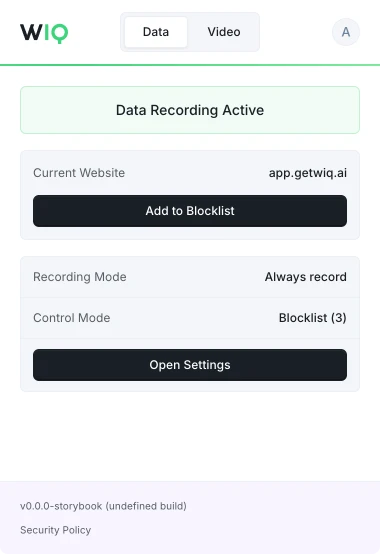
The WIQ browser extension, showing recording active on app.getwiq.ai with its blocklist and control mode

Your data. Your rules.

WIQ is built for enterprises that take data privacy seriously. Everything runs within a security framework designed for regulated industries.

Book a demo

Capture controls

Allowlist and blocklist by app, domain, and time window. Nothing outside the policy is ever recorded.

Permissions and approvals

Scope the tools each Agent can reach and the actions it can take. Set the approval gates and escalation paths before it runs.

Conformance monitoring

Every run is checked against the approved blueprint. Deviations are flagged and exceptions route to the right person.

Deployment isolation

Run locally where the work happens or inside your own cloud. The work never has to leave your environment.

SOC 2 Type II
GDPR
CCPA

Schedule a discovery session with an AI architect.

Book a demo