Help reviewers make decisions without chasing documents.

WIQ learns how your onboarding team collects evidence, checks applications, and prepares cases for compliance review, then builds agents that keep that work moving across your systems.

An analyst at a desk reviewing finance, objectives and compliance dashboards across two screens and a laptop
Potential Impact
3 days → 4 hr Onboarding time
−60% Compliance rework

Prepare onboarding case KY-2048

Prepare KY-2048 for review. Tell me what is actually blocking onboarding.

What would you like to do?

The Problem

Missing information holds up cases that should be ready for review.

Book a demo

An application in Salesforce may depend on verification in Persona and screening results in World-Check. Before a reviewer can decide, someone has to bring those records together and check that the required evidence belongs to the right applicant.

Missing documents and inconsistent references send files back through the queue. WIQ captures how experienced analysts find those gaps, follow up with applicants, and prepare the case so reviewers can spend their time on the decision.

How WIQ builds this agent.

WIQ learns the process from the way your team already runs it, then turns it into an agent you can deploy.
Book a demo

WIQ learns how your team handles the process.

WIQ observes how an analyst connects the Salesforce application with its Persona inquiry and World-Check results. It captures which documents the policy requires, how missing information is requested, and what the reviewer needs to see before making a decision.

Activity Feed Live
  • Open application KY-2048 and match the Persona inquiry referenceNadia · Salesforce43s
  • Read completed inquiry and verification outcomesNadia · Persona17s
  • Check onboarding policy v8 and required evidence listNadia · Microsoft SharePoint33s
  • Identify missing proof-of-address evidenceNadia · Persona32s
  • Review unresolved name match and secondary identifiersNadia · LSEG World-Check One5s
  • Send approved secure follow-up link for missing evidenceNadia · Persona1m 9s
  • Review screening evidence and record decision with rationaleOwen · Persona25s
  • Sync recorded review status and evidence referencesNadia · Salesforce37s

WIQ builds a Blueprint from the way your team works.

The Blueprint turns those checks into a consistent preparation process, with the right policy version and source reference attached to each result. Compliance reviews the rules for missing evidence and unresolved matches before the agent is deployed.

Customer onboarding review

Potential Savings per Case22 min
Est. Cases per Week750

Steps

6
Unverified0
Manual1
Ready5
1

Confirm the application scope

ReadySalesforcePersonaLSEG World-Check OneMicrosoft SharePoint

Match the Salesforce application to its linked Persona inquiry and expected applicant; load the relevant Microsoft SharePoint policy version.

  1. 1.1Open an application from the team’s Standard onboarding review queue in Salesforce (ex: KY-2048). Read Persona_Inquiry_ID__c and confirm that the linked inquiry’s applicant reference matches the application.
  2. 1.2Check the application’s product, legal entity, and review owner. Select the corresponding effective onboarding checklist in Microsoft SharePoint and retain its version and effective date.
  3. 1.3Compare the applicant references across the application, inquiry, and linked LSEG World-Check One case. Route a mismatched reference to the assigned onboarding specialist before copying any screening result.
  4. 1.4Create a checklist keyed to the application ID with evidence links and review status. Store document references in Salesforce rather than copies of identity documents.
2

Check file completeness

ReadyPersona

Read Persona verification outcomes and required evidence. Request missing documents through the secure flow rather than email attachments.

  1. 2.1Read each Persona verification result and the inquiry status separately. An inquiry marked completed means the collection flow finished; it does not replace an approved review decision.
  2. 2.2Compare the collected documents with the selected checklist, including document type, applicant name, address, and validity requirements. Mark each missing or expired item explicitly (ex: proof of address missing).
  3. 2.3For missing evidence, prepare the appropriate configured follow-up inquiry and link it to the existing case. Show the assigned specialist the request before sending the secure Persona link.
  4. 2.4After approval, send the link once and record the follow-up inquiry ID and sent time. Keep each outstanding evidence check incomplete until the returned documents have been reviewed against the checklist.
3

Assemble screening evidence

ReadyLSEG World-Check One

Read LSEG World-Check One results, capture source references and secondary identifiers, and preserve unresolved matches for review.

  1. 3.1Open the linked LSEG World-Check One case and retain the screening time, World-Check IDs, and result statuses. Check the configured screening group before interpreting any unresolved match.
  2. 3.2Compare Name, Date(s) of Birth, Nationality, and Country Location with verified evidence. Show discrepancies side by side (ex: different birth years) and mark missing secondary identifiers as unavailable.
  3. 3.3Include the group’s secondary-identifier and auto-resolution settings in the review context. Do not treat a birth-year difference as an automatic dismissal when the result remains unresolved.
  4. 3.4Link each comparison to its source record and prepare unresolved hits for the assigned reviewer. Preserve the original results and any contradictory evidence with the proposed explanation.
4

Prepare the review packet

ReadyPersona

Attach evidence references and a completeness checklist to the Persona case. Make missing information and contradictions explicit.

  1. 4.1Attach the inquiry links, selected checklist version, and World-Check results to the linked Persona case. Use the team’s packet sections Identity, Address evidence, Screening, and Decision needed.
  2. 4.2Set each checklist item from the current evidence rather than copying a prior case’s status. Put the exact missing document or unresolved comparison beside each incomplete item.
  3. 4.3After the onboarding specialist authorizes routing, assign the case through the configured compliance-review queue and record the owner and time. Keep secure follow-ups linked to this case rather than opening an independent review.
  4. 4.4When new evidence arrives, refresh the corresponding packet section and retain the request history. Leave any screening decision with the assigned reviewer even if every document is now present.
5

Obtain a recorded decision

ManualPersona

An authorized compliance reviewer evaluates the packet and records the acceptance or escalation decision and rationale.

  1. 5.1Have the authorized reviewer check returned evidence against the selected checklist and inspect unresolved World-Check comparisons. Their review must address each missing identifier and discrepancy identified in the packet.
  2. 5.2Read the recorded screening disposition, reason, and source comparison. For a result resolved as a different individual, require the supporting rationale before treating that hit as resolved.
  3. 5.3Check the Persona decision record for the reviewer’s identity, decision, and timestamp. A message saying the review is done is a prompt to check the record, not a substitute for it.
  4. 5.4If the decision is missing, the source links have changed, or a new hit is unresolved, return the case to its reviewer with that specific gap and keep onboarding pending.
Human input required

A person signs off before this step completes.

6

Synchronize and verify

ReadySalesforcePersonaLSEG World-Check One

Read the recorded Persona decision before updating Salesforce. Keep onboarding pending if any required decision or evidence is absent.

  1. 6.1Re-read the Persona case, linked follow-ups, and LSEG World-Check One dispositions together. Synchronize only when the evidence and authorized decision refer to the same application and meet the selected checklist.
  2. 6.2Update the team’s Salesforce fields Onboarding_Status__c, Review_Decision_At__c, and Persona_Case_ID__c with the recorded decision and source reference. Do not trigger account activation from this workflow.
  3. 6.3Re-open the Salesforce application and compare its saved status, decision time, and reviewer link with the source decision. Leave a synchronization exception if Salesforce rejects any required field.
  4. 6.4Retain the original application time, evidence-request time, response time, and decision time. These distinguish time spent waiting on the applicant from time spent preparing the review.

Tools

4

Required tools and integrations.

Salesforce

Application record, assigned reviewer, and onboarding status

Ready

Persona

Identity inquiries, secure follow-ups, and review cases

Ready

LSEG World-Check One

Screening results and secondary-identifier evidence

Ready

Microsoft SharePoint

Versioned customer acceptance and evidence checklist

Ready

Escalation Paths

3

What happens when automation can't or shouldn't proceed on its own.

Possible screening match

Keep the case pending for compliance; a name score alone cannot establish or dismiss a match.

Conflicting identity evidence

Request a reviewer assessment without guessing which record is correct.

Incomplete or expired evidence

Use the secure follow-up flow and preserve the case's pending status.

Guardrails

3

Hard limits the automation must not cross.

No autonomous acceptance, rejection, or account activation in this workflow.

Do not copy full identity documents or identifiers into CRM notes or ordinary chat.

Do not infer risk from a name, nationality, or other attribute outside the approved evidence-based review policy.

Deploy the agent to the platform your team uses.

The agent runs in Claude with access to the application, inquiry, screening results, and approved checklist. It coordinates the review while keeping identity documents in the verification system and the acceptance decision with the authorized reviewer.

Deployment
1. Blueprint ApprovalWithdraw
2. Select PlatformWIQ AgentClaudeMicrosoft CopilotOpenAIWorkaton8nCustom APIWIQ Agent
3. DeploymentDeployRelease v1 · DeployedWithdrawLaunch
4. Deploy to Test
5. Deploy to Prod

Customer onboarding review

Potential Savings per Case22 min
Est. Cases per Week750

Steps

6
Unverified0
Manual1
Ready5
1

Confirm the application scope

ReadySalesforcePersonaLSEG World-Check OneMicrosoft SharePoint

Match the Salesforce application to its linked Persona inquiry and expected applicant; load the relevant Microsoft SharePoint policy version.

  1. 1.1Open an application from the team’s Standard onboarding review queue in Salesforce (ex: KY-2048). Read Persona_Inquiry_ID__c and confirm that the linked inquiry’s applicant reference matches the application.
  2. 1.2Check the application’s product, legal entity, and review owner. Select the corresponding effective onboarding checklist in Microsoft SharePoint and retain its version and effective date.
  3. 1.3Compare the applicant references across the application, inquiry, and linked LSEG World-Check One case. Route a mismatched reference to the assigned onboarding specialist before copying any screening result.
  4. 1.4Create a checklist keyed to the application ID with evidence links and review status. Store document references in Salesforce rather than copies of identity documents.
2

Check file completeness

ReadyPersona

Read Persona verification outcomes and required evidence. Request missing documents through the secure flow rather than email attachments.

  1. 2.1Read each Persona verification result and the inquiry status separately. An inquiry marked completed means the collection flow finished; it does not replace an approved review decision.
  2. 2.2Compare the collected documents with the selected checklist, including document type, applicant name, address, and validity requirements. Mark each missing or expired item explicitly (ex: proof of address missing).
  3. 2.3For missing evidence, prepare the appropriate configured follow-up inquiry and link it to the existing case. Show the assigned specialist the request before sending the secure Persona link.
  4. 2.4After approval, send the link once and record the follow-up inquiry ID and sent time. Keep each outstanding evidence check incomplete until the returned documents have been reviewed against the checklist.
3

Assemble screening evidence

ReadyLSEG World-Check One

Read LSEG World-Check One results, capture source references and secondary identifiers, and preserve unresolved matches for review.

  1. 3.1Open the linked LSEG World-Check One case and retain the screening time, World-Check IDs, and result statuses. Check the configured screening group before interpreting any unresolved match.
  2. 3.2Compare Name, Date(s) of Birth, Nationality, and Country Location with verified evidence. Show discrepancies side by side (ex: different birth years) and mark missing secondary identifiers as unavailable.
  3. 3.3Include the group’s secondary-identifier and auto-resolution settings in the review context. Do not treat a birth-year difference as an automatic dismissal when the result remains unresolved.
  4. 3.4Link each comparison to its source record and prepare unresolved hits for the assigned reviewer. Preserve the original results and any contradictory evidence with the proposed explanation.
4

Prepare the review packet

ReadyPersona

Attach evidence references and a completeness checklist to the Persona case. Make missing information and contradictions explicit.

  1. 4.1Attach the inquiry links, selected checklist version, and World-Check results to the linked Persona case. Use the team’s packet sections Identity, Address evidence, Screening, and Decision needed.
  2. 4.2Set each checklist item from the current evidence rather than copying a prior case’s status. Put the exact missing document or unresolved comparison beside each incomplete item.
  3. 4.3After the onboarding specialist authorizes routing, assign the case through the configured compliance-review queue and record the owner and time. Keep secure follow-ups linked to this case rather than opening an independent review.
  4. 4.4When new evidence arrives, refresh the corresponding packet section and retain the request history. Leave any screening decision with the assigned reviewer even if every document is now present.
5

Obtain a recorded decision

ManualPersona

An authorized compliance reviewer evaluates the packet and records the acceptance or escalation decision and rationale.

  1. 5.1Have the authorized reviewer check returned evidence against the selected checklist and inspect unresolved World-Check comparisons. Their review must address each missing identifier and discrepancy identified in the packet.
  2. 5.2Read the recorded screening disposition, reason, and source comparison. For a result resolved as a different individual, require the supporting rationale before treating that hit as resolved.
  3. 5.3Check the Persona decision record for the reviewer’s identity, decision, and timestamp. A message saying the review is done is a prompt to check the record, not a substitute for it.
  4. 5.4If the decision is missing, the source links have changed, or a new hit is unresolved, return the case to its reviewer with that specific gap and keep onboarding pending.
Human input required

A person signs off before this step completes.

6

Synchronize and verify

ReadySalesforcePersonaLSEG World-Check One

Read the recorded Persona decision before updating Salesforce. Keep onboarding pending if any required decision or evidence is absent.

  1. 6.1Re-read the Persona case, linked follow-ups, and LSEG World-Check One dispositions together. Synchronize only when the evidence and authorized decision refer to the same application and meet the selected checklist.
  2. 6.2Update the team’s Salesforce fields Onboarding_Status__c, Review_Decision_At__c, and Persona_Case_ID__c with the recorded decision and source reference. Do not trigger account activation from this workflow.
  3. 6.3Re-open the Salesforce application and compare its saved status, decision time, and reviewer link with the source decision. Leave a synchronization exception if Salesforce rejects any required field.
  4. 6.4Retain the original application time, evidence-request time, response time, and decision time. These distinguish time spent waiting on the applicant from time spent preparing the review.

Tools

4

Required tools and integrations.

Salesforce

Application record, assigned reviewer, and onboarding status

Ready

Persona

Identity inquiries, secure follow-ups, and review cases

Ready

LSEG World-Check One

Screening results and secondary-identifier evidence

Ready

Microsoft SharePoint

Versioned customer acceptance and evidence checklist

Ready

Escalation Paths

3

What happens when automation can't or shouldn't proceed on its own.

Possible screening match

Keep the case pending for compliance; a name score alone cannot establish or dismiss a match.

Conflicting identity evidence

Request a reviewer assessment without guessing which record is correct.

Incomplete or expired evidence

Use the secure follow-up flow and preserve the case's pending status.

Guardrails

3

Hard limits the automation must not cross.

No autonomous acceptance, rejection, or account activation in this workflow.

Do not copy full identity documents or identifiers into CRM notes or ordinary chat.

Do not infer risk from a name, nationality, or other attribute outside the approved evidence-based review policy.

WIQ
Claude
Microsoft Copilot
OpenAI
Workato
n8n
Custom API

The Impact

Track how the agent changes the outcome.

See it on your processes

Onboarding time: 3 days → 4 hr

Document follow-up and screening preparation can proceed together, so a complete application does not spend another day waiting for someone to notice what is missing.

Compliance rework: ↓ 60%

Checking the evidence list, policy version, and applicant references before handoff gives the reviewer fewer reasons to send the file back.

An operations lead at a desk, the WIQ app's privacy and blocklist settings open on the laptop beside her
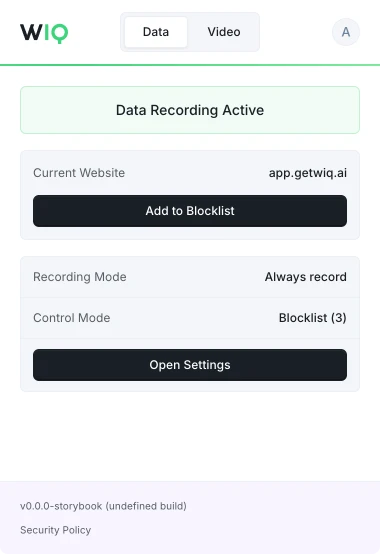
The WIQ browser extension, showing recording active on app.getwiq.ai with its blocklist and control mode

Your data. Your rules.

WIQ is built for enterprises that take data privacy seriously. Everything runs within a security framework designed for regulated industries.

Book a demo

Capture controls

Allowlist and blocklist by app, domain, and time window. Nothing outside the policy is ever recorded.

Permissions and approvals

Scope the tools each Agent can reach and the actions it can take. Set the approval gates and escalation paths before it runs.

Conformance monitoring

Every run is checked against the approved blueprint. Deviations are flagged and exceptions route to the right person.

Deployment isolation

Run locally where the work happens or inside your own cloud. The work never has to leave your environment.

SOC 2 Type II
GDPR
CCPA

Schedule a discovery session with an AI architect.

Book a demo