Give investigators the context they need to act sooner.

WIQ learns how your fraud team investigates alerts across transaction records, identity checks, and customer history, then builds agents that gather the evidence and prepare cases for review.

The colonnade and carved pediment of a classical institutional building against a clear sky
Potential Impact
−35 min/cs. Investigation time
−30% Fraud losses

Investigate alert ATO-771

Prepare ATO-771 for the on-duty fraud lead. Is anything time-sensitive?

What would you like to do?

The Problem

Investigators need more context than the alert alone can provide.

Book a demo

An unusual payment may require a review of identity records, recent support contacts, and earlier account activity. Analysts have to gather that information across systems while also checking whether the payment status is still current.

WIQ captures how experienced investigators build the timeline, distinguish confirmed facts from unresolved questions, and escalate time-sensitive cases. An agent can then prepare that evidence while the fraud lead focuses on the appropriate action.

How WIQ builds this agent.

WIQ learns the process from the way your team already runs it, then turns it into an agent you can deploy.
Book a demo

WIQ learns how your team handles the process.

WIQ observes an investigator reviewing Unit21 alerts alongside Persona verification history and Zendesk account-access tickets. It captures the evidence they use, the order of their checks, and how they decide which cases need immediate attention.

Activity Feed Live
  • Open ATO-771: unusual transfer sequence after device changeAlex · Unit2124s
  • Read transaction timeline, entity links, and payment statusAlex · Unit211m 2s
  • Check original verification reference and latest verification timestampAlex · Persona19s
  • Find customer ticket reporting an unrequested password resetAlex · Zendesk7s
  • Read account-takeover response playbook v4Alex · Microsoft SharePoint30s
  • Attach support evidence and prepare urgent investigation packetAlex · Unit211m 6s
  • Record fraud-lead decision and source action referenceSam · Unit218s
  • Verify recorded disposition and assign follow-up reviewAlex · Unit2121s

WIQ builds a Blueprint from the way your team works.

The Blueprint covers the transaction timeline, source timestamps, related customer records, and case narrative. The fraud lead reviews the escalation deadlines and decision points so the agent can prepare the case with the right context.

Account takeover investigation

Potential Savings per Case35 min
Est. Cases per Week450

Steps

6
Unverified0
Manual1
Ready5
1

Establish the alert timeline

ReadyUnit21

Read Unit21 alert, transaction references, timestamps, and latest status. Distinguish a queued transaction from settled funds.

  1. 1.1Open the next case in the team’s Account takeover review queue in Unit21 (ex: ATO-771). Collect the linked entity, alerts, and transaction references, retaining the feed’s last-update time beside each status.
  2. 1.2Order password resets, new-device events, and transfer attempts by occurrence time. Keep ingestion time separate so delayed events do not change the apparent sequence.
  3. 1.3Total the relevant queued transfers and retain each amount, currency, and destination reference (ex: three USD transfers totaling $18,600). Describe queued amounts as exposure rather than settled loss.
  4. 1.4Check for a newer update or related open investigation before preparing another case. Flag the need for a live payment-system check because the feed may lag the current transfer state.
2

Retrieve adjacent evidence

ReadyPersonaZendesk

Match the customer reference across Persona and Zendesk. Record the source and time of each fact; earlier identity verification does not prove present account control.

  1. 2.1Use the stable customer reference to find related Persona inquiries and Zendesk account-access tickets (ex: #9204). Do not join accounts using a similar name alone.
  2. 2.2Read the Persona verification date and outcome, then calculate how old the evidence is. A historical identity check does not establish who controls a newly observed device.
  3. 2.3Attach relevant Zendesk complaints to the timeline with their occurrence time, author, and channel. Check which password resets, device changes, or transfers the customer recognizes or disputes.
  4. 2.4Locate the established contact record for the callback workflow. Flag contact details changed during the incident so the investigator does not verify control through a newly supplied number.
3

Compare the playbook

ReadyMicrosoft SharePoint

Use the effective Microsoft SharePoint playbook to identify missing evidence and the required escalation path. Do not infer guilt from a single signal.

  1. 3.1Open the effective account-takeover playbook in Microsoft SharePoint and select the branch supported by the events, such as reset plus new device. Retain its version and evidence requirements in the case.
  2. 3.2Complete the team’s investigation checklist entries for Reset event, New device, Transfer state, and Customer contact. Mark live payment checks or callbacks outstanding when their evidence is missing.
  3. 3.3Explain whether the event sequence and customer statements meet the playbook’s urgency criteria, preserving earlier identity checks as context. Separate observed facts from an inference about account takeover.
  4. 3.4If urgency criteria are met, use the configured urgent-review route to the on-duty fraud lead; otherwise follow the standard review route. Keep intervention and reporting decisions with their authorized reviewers.
4

Prepare urgent review

ReadyUnit21

Attach the chronology, contradictions, and proposed next steps to Unit21; alert the assigned fraud lead through the configured case workflow.

  1. 4.1Add the chronology and source links to Unit21, with a separate row for each relevant transfer. Put the latest feed timestamp beside the exposure total so the reviewer can assess freshness.
  2. 4.2Use the team’s case-note sections Evidence, Gaps, and Proposed action. Ask the lead to verify current transfer state and arrange a callback through the established contact route.
  3. 4.3Assign urgent cases to the on-duty lead through the configured case workflow and record the handoff time. Verify the saved owner so the packet is not left in the general queue.
  4. 4.4Keep the case open and append newer transaction events to the same packet. If a transfer has settled, update the proposed response before the lead acts.
5

Lead determines intervention

Manual

The authorized fraud lead decides on protective actions in the payment system and customer verification. Regulatory reporting has its own authorized review.

  1. 5.1The authorized fraud lead checks the relevant transaction references in the live payment system before deciding whether a temporary hold is possible. Supply those references and preserve the recorded decision.
  2. 5.2If the lead authorizes an intervention, the authorized operator applies it in the payment system. Require a confirmation with the affected transactions, action time, and operator identity.
  3. 5.3Arrange the callback through the verified-contact workflow and retain its outcome separately from the hold. A successful hold does not establish that the customer has regained account control.
  4. 5.4Leave any suspicious-activity filing decision with the designated reviewer. Do not convert the case’s urgency or exposure amount into an automatic reporting conclusion.
Human input required

A person signs off before this step completes.

6

Record and verify follow-up

ReadyUnit21

Re-read the Unit21 case and source action evidence. Mark any intervention unverified until its system confirmation is attached.

  1. 6.1Read the attached payment-system confirmation and compare its covered transaction references with the case. Mark an intervention verified only for the transactions named in that evidence.
  2. 6.2Update the case chronology with the operator, confirmation reference, and effective time. Keep the earlier transaction states and feed timestamps available in the audit history.
  3. 6.3Keep Customer callback outstanding until its outcome is recorded and retain the assigned lead as owner. Set the next review using the callback commitment and any intervention expiry shown in the confirmation.
  4. 6.4Record eventual loss, recovery, and legitimate-customer impact when those outcomes are known. Do not count the full exposure as prevented loss simply because a temporary hold was placed.

Tools

4

Required tools and integrations.

Unit21

Alerts, transaction context, case evidence, and recorded dispositions

Ready

Persona

Original verification references and verification history

Ready

Zendesk

Account-access support history and verified contact workflow

Ready

Microsoft SharePoint

Versioned investigation and escalation playbook

Ready

Escalation Paths

3

What happens when automation can't or shouldn't proceed on its own.

Potentially time-sensitive loss

Notify the on-duty fraud lead with a timestamped packet; do not wait to complete a cosmetic narrative.

Stale or conflicting payment status

Ask an authorized operator to verify the source payment system before claiming an intervention succeeded.

Potential AML escalation

Route to the financial-crime reviewer. Fraud suspicion alone does not establish a filing obligation.

Guardrails

3

Hard limits the automation must not cross.

No autonomous account freeze, transaction block, customer accusation, or regulatory filing.

A passed historical identity check is not evidence that the current user controls the account legitimately.

Keep observed facts, customer statements, and analyst conclusions distinguishable in the case narrative.

Deploy the agent to the platform your team uses.

The agent runs in Claude with access to the relevant cases and evidence, following the team’s investigation procedure. The fraud team retains control of payment holds, account restrictions, customer verification, and regulatory reporting.

Deployment
1. Blueprint ApprovalWithdraw
2. Select PlatformWIQ AgentClaudeMicrosoft CopilotOpenAIWorkaton8nCustom APIWIQ Agent
3. DeploymentDeployRelease v1 · DeployedWithdrawLaunch
4. Deploy to Test
5. Deploy to Prod

Account takeover investigation

Potential Savings per Case35 min
Est. Cases per Week450

Steps

6
Unverified0
Manual1
Ready5
1

Establish the alert timeline

ReadyUnit21

Read Unit21 alert, transaction references, timestamps, and latest status. Distinguish a queued transaction from settled funds.

  1. 1.1Open the next case in the team’s Account takeover review queue in Unit21 (ex: ATO-771). Collect the linked entity, alerts, and transaction references, retaining the feed’s last-update time beside each status.
  2. 1.2Order password resets, new-device events, and transfer attempts by occurrence time. Keep ingestion time separate so delayed events do not change the apparent sequence.
  3. 1.3Total the relevant queued transfers and retain each amount, currency, and destination reference (ex: three USD transfers totaling $18,600). Describe queued amounts as exposure rather than settled loss.
  4. 1.4Check for a newer update or related open investigation before preparing another case. Flag the need for a live payment-system check because the feed may lag the current transfer state.
2

Retrieve adjacent evidence

ReadyPersonaZendesk

Match the customer reference across Persona and Zendesk. Record the source and time of each fact; earlier identity verification does not prove present account control.

  1. 2.1Use the stable customer reference to find related Persona inquiries and Zendesk account-access tickets (ex: #9204). Do not join accounts using a similar name alone.
  2. 2.2Read the Persona verification date and outcome, then calculate how old the evidence is. A historical identity check does not establish who controls a newly observed device.
  3. 2.3Attach relevant Zendesk complaints to the timeline with their occurrence time, author, and channel. Check which password resets, device changes, or transfers the customer recognizes or disputes.
  4. 2.4Locate the established contact record for the callback workflow. Flag contact details changed during the incident so the investigator does not verify control through a newly supplied number.
3

Compare the playbook

ReadyMicrosoft SharePoint

Use the effective Microsoft SharePoint playbook to identify missing evidence and the required escalation path. Do not infer guilt from a single signal.

  1. 3.1Open the effective account-takeover playbook in Microsoft SharePoint and select the branch supported by the events, such as reset plus new device. Retain its version and evidence requirements in the case.
  2. 3.2Complete the team’s investigation checklist entries for Reset event, New device, Transfer state, and Customer contact. Mark live payment checks or callbacks outstanding when their evidence is missing.
  3. 3.3Explain whether the event sequence and customer statements meet the playbook’s urgency criteria, preserving earlier identity checks as context. Separate observed facts from an inference about account takeover.
  4. 3.4If urgency criteria are met, use the configured urgent-review route to the on-duty fraud lead; otherwise follow the standard review route. Keep intervention and reporting decisions with their authorized reviewers.
4

Prepare urgent review

ReadyUnit21

Attach the chronology, contradictions, and proposed next steps to Unit21; alert the assigned fraud lead through the configured case workflow.

  1. 4.1Add the chronology and source links to Unit21, with a separate row for each relevant transfer. Put the latest feed timestamp beside the exposure total so the reviewer can assess freshness.
  2. 4.2Use the team’s case-note sections Evidence, Gaps, and Proposed action. Ask the lead to verify current transfer state and arrange a callback through the established contact route.
  3. 4.3Assign urgent cases to the on-duty lead through the configured case workflow and record the handoff time. Verify the saved owner so the packet is not left in the general queue.
  4. 4.4Keep the case open and append newer transaction events to the same packet. If a transfer has settled, update the proposed response before the lead acts.
5

Lead determines intervention

Manual

The authorized fraud lead decides on protective actions in the payment system and customer verification. Regulatory reporting has its own authorized review.

  1. 5.1The authorized fraud lead checks the relevant transaction references in the live payment system before deciding whether a temporary hold is possible. Supply those references and preserve the recorded decision.
  2. 5.2If the lead authorizes an intervention, the authorized operator applies it in the payment system. Require a confirmation with the affected transactions, action time, and operator identity.
  3. 5.3Arrange the callback through the verified-contact workflow and retain its outcome separately from the hold. A successful hold does not establish that the customer has regained account control.
  4. 5.4Leave any suspicious-activity filing decision with the designated reviewer. Do not convert the case’s urgency or exposure amount into an automatic reporting conclusion.
Human input required

A person signs off before this step completes.

6

Record and verify follow-up

ReadyUnit21

Re-read the Unit21 case and source action evidence. Mark any intervention unverified until its system confirmation is attached.

  1. 6.1Read the attached payment-system confirmation and compare its covered transaction references with the case. Mark an intervention verified only for the transactions named in that evidence.
  2. 6.2Update the case chronology with the operator, confirmation reference, and effective time. Keep the earlier transaction states and feed timestamps available in the audit history.
  3. 6.3Keep Customer callback outstanding until its outcome is recorded and retain the assigned lead as owner. Set the next review using the callback commitment and any intervention expiry shown in the confirmation.
  4. 6.4Record eventual loss, recovery, and legitimate-customer impact when those outcomes are known. Do not count the full exposure as prevented loss simply because a temporary hold was placed.

Tools

4

Required tools and integrations.

Unit21

Alerts, transaction context, case evidence, and recorded dispositions

Ready

Persona

Original verification references and verification history

Ready

Zendesk

Account-access support history and verified contact workflow

Ready

Microsoft SharePoint

Versioned investigation and escalation playbook

Ready

Escalation Paths

3

What happens when automation can't or shouldn't proceed on its own.

Potentially time-sensitive loss

Notify the on-duty fraud lead with a timestamped packet; do not wait to complete a cosmetic narrative.

Stale or conflicting payment status

Ask an authorized operator to verify the source payment system before claiming an intervention succeeded.

Potential AML escalation

Route to the financial-crime reviewer. Fraud suspicion alone does not establish a filing obligation.

Guardrails

3

Hard limits the automation must not cross.

No autonomous account freeze, transaction block, customer accusation, or regulatory filing.

A passed historical identity check is not evidence that the current user controls the account legitimately.

Keep observed facts, customer statements, and analyst conclusions distinguishable in the case narrative.

WIQ
Claude
Microsoft Copilot
OpenAI
Workato
n8n
Custom API

The Impact

Track how the agent changes the outcome.

See it on your processes

Investigation time: ↓ 35 min/case

The investigator receives the transaction timeline, identity history, support report, and source links together instead of collecting them across three systems.

Fraud losses: ↓ 30%

Earlier review can create more opportunities for authorized intervention before funds leave. The temporary hold in the demo shows that mechanism; the final case decision determines whether a loss was prevented.

An operations lead at a desk, the WIQ app's privacy and blocklist settings open on the laptop beside her
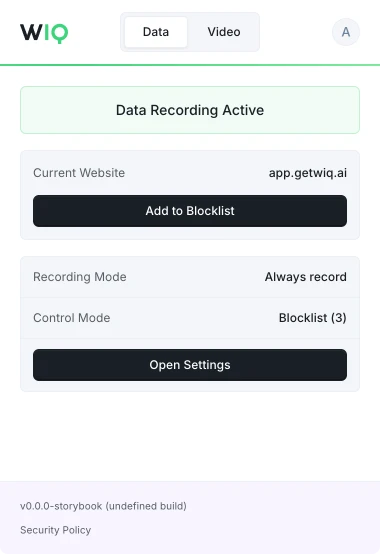
The WIQ browser extension, showing recording active on app.getwiq.ai with its blocklist and control mode

Your data. Your rules.

WIQ is built for enterprises that take data privacy seriously. Everything runs within a security framework designed for regulated industries.

Book a demo

Capture controls

Allowlist and blocklist by app, domain, and time window. Nothing outside the policy is ever recorded.

Permissions and approvals

Scope the tools each Agent can reach and the actions it can take. Set the approval gates and escalation paths before it runs.

Conformance monitoring

Every run is checked against the approved blueprint. Deviations are flagged and exceptions route to the right person.

Deployment isolation

Run locally where the work happens or inside your own cloud. The work never has to leave your environment.

SOC 2 Type II
GDPR
CCPA

Schedule a discovery session with an AI architect.

Book a demo