The trade lifecycle, run by agents that know your contracts.

Confirmation, settlement, demurrage, quality claims – WIQ learns each process from your GAFTA and FOSFA terms, your CTRM, and your spreadsheets, then ships it as a production agent your desk runs.

Aerial view of an agricultural landscape
Potential Impact
−55% Settlement cycle
+12% Demurrage rec.

Settlement – ready-to-settle trades

which trades are ready to settle?

What would you like to do?

The Problem

Behind every trade sits a stack of repetitive processes.

Book a demo

A commodity and agriculture trading operation runs far more than the desk you see. Behind every trade sits confirmation, settlement, contract reconciliation, demurrage, and quality claims – and all of it threads through scattered terrain. The terms come from GAFTA and FOSFA contracts. The back-and-forth runs over email with counterparties, brokers, and inspectors. The work itself moves through tools in the browser, like a CTRM such as Agiblocks and the bank portals, and on the desktop, like Excel and Outlook, alongside a steady stream of SGS inspection PDFs.

Most of it is repetitive: matching a weight certificate to a contract, applying a moisture discount from the quality cert, reconciling a confirmation that's off by a rounding. The cases that need a person – a cargo rejected on spec, documents that don't line up with a letter of credit – are fewer, and that's where the desk's judgment earns its keep.

Lifecycle tools cover one slice. The desk runs all of them.

There are vertical agents built for this world, like ClearDox and ClearOpx, but they live inside the trade lifecycle and tend to cover one slice of it. None runs the whole of settlement alongside confirmations and claims, let alone the processes sitting over in finance or compliance.

How your desk's processes run on WIQ.

WIQ takes how your team already runs a process – your contracts, your tools, your steps – and turns it into a production agent with a click. We did this with Cargill. Here are a few of the processes we've automated for commodity and ag teams.
Book a demo

WIQ learns how your team handles the process.

For a week or two, WIQ quietly records how Priya and Tomáš actually run settlement – every action across Agiblocks, essDOCS / CargoDocs, Microsoft Excel, Veson IMOS and Microsoft Outlook, and the rest of the stack – with no tagging and no configuration. It learns the real sequence of steps, the handoffs between people, and the judgment calls they make along the way.

Activity Feed Live
  • Open settlement queuePriya · Agiblocks59s
  • Open trade CG-SOY-2231 flagged ready-to-settlePriya · Agiblocks1m 26s
  • Download SGS quality and weight certificate SGS-CN-88213Priya · essDOCS / CargoDocs1m 38s
  • Read quality results (moisture 12.4%, oil 18.9%, FFA 0.8%)Priya · SGS certificate (PDF)13s
  • Apply 0.5% weight franchise per contractPriya · Microsoft Excel51s
  • Calculate demurrage 1.8 days at $18,500/dayPriya · Veson IMOS1m 41s
  • Email settlement statement SS-2231 to counterpartyPriya · Microsoft Outlook30s
  • Generate final invoice INV-77432Priya · SAP S/4HANA1m 31s
  • Initiate payment instruction under L/CPriya · Bank portal / SWIFT1m 25s
  • Read SGS protein 10.4% vs contract min 11.5% (CG-WHT-2188)Priya · SGS certificate (PDF)1m 48s
  • Escalate quality shortfall to contract managerPriya · Microsoft Outlook58s
  • Review protein shortfall on CG-WHT-2188Tomáš · Agiblocks1m 6s
  • Approve $4.20/MT protein allowanceTomáš · Agiblocks33s
  • Resume settlement for CG-WHT-2188Priya · Agiblocks53s

+ 30 more events in this run

WIQ builds a Blueprint from the way your team works.

From dozens of real runs, WIQ writes a Blueprint – a precise, executable description of the process. It captures the steps in order, the tools and connectors each one needs, the points where work escalates to a person, and the guardrails the agent must never cross. Nobody writes it by hand; it’s derived entirely from how the work already happens.

Settlement

Potential Savings per Case41m 30s
Est. Cases per Week34

Steps

10
Unverified0
Manual0
Ready10
1

Detect ready-to-settle

ReadyAgiblocks (CTRM)

Poll Agiblocks for ready-to-settle trades and open a case per trade.

  1. 1.1Read Agiblocks trades in the desk’s ReadyToSettle queue and capture trade reference, commodity, counterparty, contracted quantity, currency, and delivery term.
  2. 1.2Open a working record for each trade selected by the settlements specialist (ex: CG-SOY-2231). Preserve any exclusions from the run and keep cargoes separate even when they share a counterparty.
  3. 1.3Check for an existing settlement statement or invoice against each trade reference. Resume its current stage instead of preparing a second settlement for the same cargo.
2

Gather documents

ReadyAgiblocks (CTRM)SGS / Intertek feed

Pull the bill of lading, weight cert, and SGS quality cert from CargoDocs and fetch the contract.

  1. 2.1Use the trade’s shipment references to retrieve the bill of lading, weight certificate, and quality certificate from CargoDocs. Match vessel, cargo, and shipment to the Agiblocks contract (ex: bill of lading AEG-0047).
  2. 2.2Retain the document version and issue date with each source. Compare the bill of lading, inspection certificates, and any L/C requirements before treating the document set as complete.
  3. 2.3Associate each SGS or Intertek certificate with its own cargo and contract quality clauses. A certificate from another shipment must not satisfy a missing-document requirement.
3

Reconcile quantity

Ready

Compare loaded weight to contract quantity within the franchise allowance.

  1. 3.1Read the contract’s settlement-weight basis and compare the matching certificate with the bill of lading. Retain loaded and contracted weights as separate MT columns in the working statement.
  2. 3.2Calculate the difference between contracted and certified weight in MT and as a percentage, then compare it with the contract’s franchise (ex: 180 MT short on 50,000 MT is 0.36%, within a 0.5% allowance).
  3. 3.3Use the contract’s quantity-settlement rule to determine payable weight. Retain certified quantity, tolerance result, and any authorized adjustment separately; escalate differences outside the applicable tolerance.
4

Apply quality adjustments

ReadySGS / Intertek feed

Read moisture, oil, protein, and FFA from the cert and apply the contract's premium / discount schedule.

  1. 4.1Read each SGS parameter with its unit and test basis, then select the matching contract schedule. Evaluate moisture, oil, protein, and FFA only where applicable to the commodity and agreement.
  2. 4.2Compare each result with the contract’s specification and reject bands. For an exception (ex: 10.4% protein against an 11.5% minimum), hold pricing and attach the certificate and relevant clause to the CONTRACT_MGR task.
  3. 4.3After the contract manager records an allowance, claim, or rejection, follow that decision. Apply an approved allowance to the authorized quantity (ex: $4.20/MT), retaining the decision reference separately from the standard schedule.
5

Calculate final price

ReadyAgiblocks (CTRM)

Apply the pricing basis (futures + basis) and FX, and reconcile to the provisional value.

  1. 5.1Read the pricing fixings and contract formula in Agiblocks, including futures month, basis unit, currency, and any agreed FX fixing. Do not use a current market quote in place of a contractual fixing.
  2. 5.2Apply the contract’s fixed futures month and basis, converting quoted units to the settlement unit before adding quality adjustments. For example, a CBOT November fixing with a +65 basis requires the contract’s specified basis unit.
  3. 5.3Compare the final value with the provisional statement line by line. Record the percentage variance, its price or quantity drivers, and the desk’s review result before accepting a difference.
6

Freight & demurrage

ReadyVeson IMOS

Run laytime in Veson IMOS for demurrage or dispatch, and add freight per the Incoterm.

  1. 6.1Open the voyage in Veson IMOS using the trade’s vessel and port-call references. Compare notice of readiness, time sheets, and allowed laytime with the governing charter terms.
  2. 6.2Review countable periods and excluded time, then multiply chargeable days by the agreed rate (ex: 1.8 days × $18,500 = $33,300). Carry the result into the statement with the calculation reference.
  3. 6.3Check who bears freight and delay charges under the sales contract and delivery term. Where dispatch is earned, calculate the credit under that voyage’s terms rather than reusing another cargo’s demurrage treatment.
7

Assemble statement

Ready

Combine quantity, quality, price, freight, and demurrage into a settlement statement.

  1. 7.1Create a settlement statement with separate quantity, base price, quality adjustment, freight, and demurrage lines. Link each amount to its contract clause, certificate, fixing, or laytime calculation.
  2. 7.2Reconcile the final total with provisional invoices, deposits, and prior credits before calculating the balance due. Keep currency conversions and rounding visible in the working record.
  3. 7.3Save a numbered statement revision for each cargo (ex: SS-2231, revision 1). A later allowance or disputed charge creates a revised statement instead of silently replacing the version sent.
8

Reconcile with counterparty

Ready

Email the statement and resolve any differences within tolerance.

  1. 8.1Use Microsoft Outlook to send the statement to the established counterparty settlement contact, with trade and statement references in the subject. Retain the sent message and attachment revision.
  2. 8.2Match the counterparty’s confirmation reply to the statement reference, revision, currency, and exact figures sent. An acknowledgment of receipt is not agreement to the balance.
  3. 8.3Log each disputed line against its source evidence and contract tolerance. Keep the statement awaiting confirmation until the counterparty agrees to the current revision.
9

Invoice & post

ReadyAgiblocks (CTRM)SAP S/4HANA

On the L/C document check and counterparty confirmation, post the invoice in S/4HANA (human-approved).

  1. 9.1Check counterparty confirmation and any required L/C document review for the current statement. Present the final invoice amounts and supporting records to the authorized settlements reviewer for posting approval.
  2. 9.2Before posting in SAP S/4HANA, search the trade and statement references for an existing accounting document. Verify company code, posting period, currency, customer account, and approved invoice amount.
  3. 9.3After approval, post the invoice and read back its accounting document reference and ledger status (ex: INV-77432). Record that reference in Agiblocks while retaining the separate Treasury payment status.
Human input required

A person signs off before this step completes.

10

Settle cash

ReadyBank / SWIFT gateway

Prepare the payment instruction; the agent never releases funds – Treasury releases on value date.

  1. 10.1Use the approved settlement and L/C instructions to determine the payer, beneficiary, currency, amount, and value date. Compare beneficiary details with the approved bank master rather than email instructions.
  2. 10.2Prepare the Bank / SWIFT gateway instruction with the current trade, statement, and invoice references. Check for an already staged instruction under those references before saving another.
  3. 10.3Route the prepared instruction to Treasury for release on value date. Keep staged, released, and bank-confirmed states separate, and attach the bank confirmation before recording completed cash settlement.
Human input required

A person signs off before this step completes.

Tools

7

Required tools and integrations.

Agiblocks (CTRM)

Trade capture, position, settle trigger

Ready

SAP S/4HANA

Invoicing & GL postings

Ready

essDOCS / CargoDocs

Electronic shipping & trade docs

Ready

SGS / Intertek feed

Quality & weight certificates

Ready

Veson IMOS

Laytime & demurrage calculation

Ready

Microsoft Graph (Outlook)

Counterparty reconciliation

Ready

Bank / SWIFT gateway

Payment initiation (release is human)

Ready

Escalation Paths

3

What happens when automation can't or shouldn't proceed on its own.

Quality or quantity dispute

Inspection results outside contract spec halt pricing and route to the trader / contract manager for an allowance, claim, or rejection.

Document discrepancy under an L/C

If shipping documents don't match the L/C terms, escalate to trade finance before the bank rejects presentation.

Reconciliation break

If final figures don't agree with the counterparty and can't be resolved within SLA, route to the desk / credit / finance.

Guardrails

4

Hard limits the automation must not cross.

Never price a cargo with any quality parameter outside the contract's reject band – halt and escalate.

Never present documents under an L/C with an unresolved discrepancy.

Invoice posting always requires human approval.

The agent never releases funds – payment is routed to Treasury for release.

Deploy the agent to the platform your team uses.

A Blueprint isn’t locked to WIQ. Deploy it as an agent to the platform your team already uses – Claude, Microsoft Copilot, OpenAI, or your own stack – and it runs there with the same steps, connectors, escalation paths, and guardrails intact.

Deployment
1. Blueprint ApprovalWithdraw
2. Select PlatformWIQ AgentClaudeMicrosoft CopilotOpenAIWorkaton8nCustom APIWIQ Agent
3. DeploymentDeployRelease v1 · DeployedWithdrawLaunch
4. Deploy to Test
5. Deploy to Prod

Settlement

Potential Savings per Case41m 30s
Est. Cases per Week34

Steps

10
Unverified0
Manual0
Ready10
1

Detect ready-to-settle

ReadyAgiblocks (CTRM)

Poll Agiblocks for ready-to-settle trades and open a case per trade.

  1. 1.1Read Agiblocks trades in the desk’s ReadyToSettle queue and capture trade reference, commodity, counterparty, contracted quantity, currency, and delivery term.
  2. 1.2Open a working record for each trade selected by the settlements specialist (ex: CG-SOY-2231). Preserve any exclusions from the run and keep cargoes separate even when they share a counterparty.
  3. 1.3Check for an existing settlement statement or invoice against each trade reference. Resume its current stage instead of preparing a second settlement for the same cargo.
2

Gather documents

ReadyAgiblocks (CTRM)SGS / Intertek feed

Pull the bill of lading, weight cert, and SGS quality cert from CargoDocs and fetch the contract.

  1. 2.1Use the trade’s shipment references to retrieve the bill of lading, weight certificate, and quality certificate from CargoDocs. Match vessel, cargo, and shipment to the Agiblocks contract (ex: bill of lading AEG-0047).
  2. 2.2Retain the document version and issue date with each source. Compare the bill of lading, inspection certificates, and any L/C requirements before treating the document set as complete.
  3. 2.3Associate each SGS or Intertek certificate with its own cargo and contract quality clauses. A certificate from another shipment must not satisfy a missing-document requirement.
3

Reconcile quantity

Ready

Compare loaded weight to contract quantity within the franchise allowance.

  1. 3.1Read the contract’s settlement-weight basis and compare the matching certificate with the bill of lading. Retain loaded and contracted weights as separate MT columns in the working statement.
  2. 3.2Calculate the difference between contracted and certified weight in MT and as a percentage, then compare it with the contract’s franchise (ex: 180 MT short on 50,000 MT is 0.36%, within a 0.5% allowance).
  3. 3.3Use the contract’s quantity-settlement rule to determine payable weight. Retain certified quantity, tolerance result, and any authorized adjustment separately; escalate differences outside the applicable tolerance.
4

Apply quality adjustments

ReadySGS / Intertek feed

Read moisture, oil, protein, and FFA from the cert and apply the contract's premium / discount schedule.

  1. 4.1Read each SGS parameter with its unit and test basis, then select the matching contract schedule. Evaluate moisture, oil, protein, and FFA only where applicable to the commodity and agreement.
  2. 4.2Compare each result with the contract’s specification and reject bands. For an exception (ex: 10.4% protein against an 11.5% minimum), hold pricing and attach the certificate and relevant clause to the CONTRACT_MGR task.
  3. 4.3After the contract manager records an allowance, claim, or rejection, follow that decision. Apply an approved allowance to the authorized quantity (ex: $4.20/MT), retaining the decision reference separately from the standard schedule.
5

Calculate final price

ReadyAgiblocks (CTRM)

Apply the pricing basis (futures + basis) and FX, and reconcile to the provisional value.

  1. 5.1Read the pricing fixings and contract formula in Agiblocks, including futures month, basis unit, currency, and any agreed FX fixing. Do not use a current market quote in place of a contractual fixing.
  2. 5.2Apply the contract’s fixed futures month and basis, converting quoted units to the settlement unit before adding quality adjustments. For example, a CBOT November fixing with a +65 basis requires the contract’s specified basis unit.
  3. 5.3Compare the final value with the provisional statement line by line. Record the percentage variance, its price or quantity drivers, and the desk’s review result before accepting a difference.
6

Freight & demurrage

ReadyVeson IMOS

Run laytime in Veson IMOS for demurrage or dispatch, and add freight per the Incoterm.

  1. 6.1Open the voyage in Veson IMOS using the trade’s vessel and port-call references. Compare notice of readiness, time sheets, and allowed laytime with the governing charter terms.
  2. 6.2Review countable periods and excluded time, then multiply chargeable days by the agreed rate (ex: 1.8 days × $18,500 = $33,300). Carry the result into the statement with the calculation reference.
  3. 6.3Check who bears freight and delay charges under the sales contract and delivery term. Where dispatch is earned, calculate the credit under that voyage’s terms rather than reusing another cargo’s demurrage treatment.
7

Assemble statement

Ready

Combine quantity, quality, price, freight, and demurrage into a settlement statement.

  1. 7.1Create a settlement statement with separate quantity, base price, quality adjustment, freight, and demurrage lines. Link each amount to its contract clause, certificate, fixing, or laytime calculation.
  2. 7.2Reconcile the final total with provisional invoices, deposits, and prior credits before calculating the balance due. Keep currency conversions and rounding visible in the working record.
  3. 7.3Save a numbered statement revision for each cargo (ex: SS-2231, revision 1). A later allowance or disputed charge creates a revised statement instead of silently replacing the version sent.
8

Reconcile with counterparty

Ready

Email the statement and resolve any differences within tolerance.

  1. 8.1Use Microsoft Outlook to send the statement to the established counterparty settlement contact, with trade and statement references in the subject. Retain the sent message and attachment revision.
  2. 8.2Match the counterparty’s confirmation reply to the statement reference, revision, currency, and exact figures sent. An acknowledgment of receipt is not agreement to the balance.
  3. 8.3Log each disputed line against its source evidence and contract tolerance. Keep the statement awaiting confirmation until the counterparty agrees to the current revision.
9

Invoice & post

ReadyAgiblocks (CTRM)SAP S/4HANA

On the L/C document check and counterparty confirmation, post the invoice in S/4HANA (human-approved).

  1. 9.1Check counterparty confirmation and any required L/C document review for the current statement. Present the final invoice amounts and supporting records to the authorized settlements reviewer for posting approval.
  2. 9.2Before posting in SAP S/4HANA, search the trade and statement references for an existing accounting document. Verify company code, posting period, currency, customer account, and approved invoice amount.
  3. 9.3After approval, post the invoice and read back its accounting document reference and ledger status (ex: INV-77432). Record that reference in Agiblocks while retaining the separate Treasury payment status.
Human input required

A person signs off before this step completes.

10

Settle cash

ReadyBank / SWIFT gateway

Prepare the payment instruction; the agent never releases funds – Treasury releases on value date.

  1. 10.1Use the approved settlement and L/C instructions to determine the payer, beneficiary, currency, amount, and value date. Compare beneficiary details with the approved bank master rather than email instructions.
  2. 10.2Prepare the Bank / SWIFT gateway instruction with the current trade, statement, and invoice references. Check for an already staged instruction under those references before saving another.
  3. 10.3Route the prepared instruction to Treasury for release on value date. Keep staged, released, and bank-confirmed states separate, and attach the bank confirmation before recording completed cash settlement.
Human input required

A person signs off before this step completes.

Tools

7

Required tools and integrations.

Agiblocks (CTRM)

Trade capture, position, settle trigger

Ready

SAP S/4HANA

Invoicing & GL postings

Ready

essDOCS / CargoDocs

Electronic shipping & trade docs

Ready

SGS / Intertek feed

Quality & weight certificates

Ready

Veson IMOS

Laytime & demurrage calculation

Ready

Microsoft Graph (Outlook)

Counterparty reconciliation

Ready

Bank / SWIFT gateway

Payment initiation (release is human)

Ready

Escalation Paths

3

What happens when automation can't or shouldn't proceed on its own.

Quality or quantity dispute

Inspection results outside contract spec halt pricing and route to the trader / contract manager for an allowance, claim, or rejection.

Document discrepancy under an L/C

If shipping documents don't match the L/C terms, escalate to trade finance before the bank rejects presentation.

Reconciliation break

If final figures don't agree with the counterparty and can't be resolved within SLA, route to the desk / credit / finance.

Guardrails

4

Hard limits the automation must not cross.

Never price a cargo with any quality parameter outside the contract's reject band – halt and escalate.

Never present documents under an L/C with an unresolved discrepancy.

Invoice posting always requires human approval.

The agent never releases funds – payment is routed to Treasury for release.

// trade-confirmation · coming_soon

Trade Confirmation

A new trade is confirmed against the broker note and counterparty: economic terms matched, the contract issued under the right GAFTA / FOSFA form, and any discrepancy flagged before it reaches settlement.

// demurrage-claims · coming_soon

Demurrage Claims

A laytime statement becomes an agreed demurrage or dispatch claim: time facts reconciled against the charter party, the claim calculated and supported with documents, and the figure negotiated to settlement.

WIQ
Claude
Microsoft Copilot
OpenAI
Workato
n8n
Custom API

The Impact

Track how the agent changes the outcome.

See it on your processes

Settlement cycle: ↓ 55%

Weight certificates, quality certs and the contract terms are read together rather than chased one at a time, and the statement goes out while the paperwork is still current.

Demurrage recovered: ↑ 12%

Laytime is worked out from the statement of facts as soon as it lands, so a claim is raised inside the window rather than after it, with the calculation attached for the counterparty to check.

An operations lead at a desk, the WIQ app's privacy and blocklist settings open on the laptop beside her
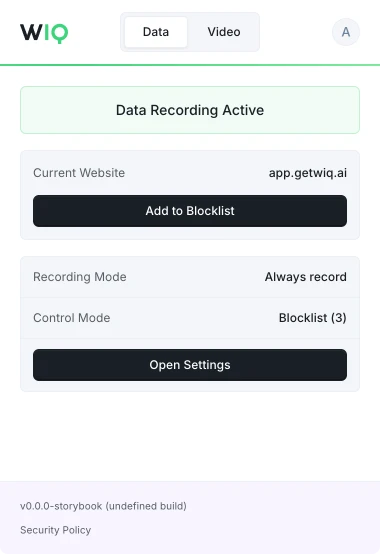
The WIQ browser extension, showing recording active on app.getwiq.ai with its blocklist and control mode

Your data. Your rules.

WIQ is built for enterprises that take data privacy seriously. Everything runs within a security framework designed for regulated industries.

Book a demo

Capture controls

Allowlist and blocklist by app, domain, and time window. Nothing outside the policy is ever recorded.

Permissions and approvals

Scope the tools each Agent can reach and the actions it can take. Set the approval gates and escalation paths before it runs.

Conformance monitoring

Every run is checked against the approved blueprint. Deviations are flagged and exceptions route to the right person.

Deployment isolation

Run locally where the work happens or inside your own cloud. The work never has to leave your environment.

SOC 2 Type II
GDPR
CCPA

Schedule a discovery session with an AI architect.

Book a demo